
Plan your orders onto the right vehicles, in the right order
Seferi does the maths of spreading thirty jobs across twenty vehicles
- 30%
- Targeted fuel saving
- 40%
- Targeted reduction in kilometres
- 1.5 min
- Time for a plan to be ready
Some of the brands that trust us





- and more
The module from start to finish
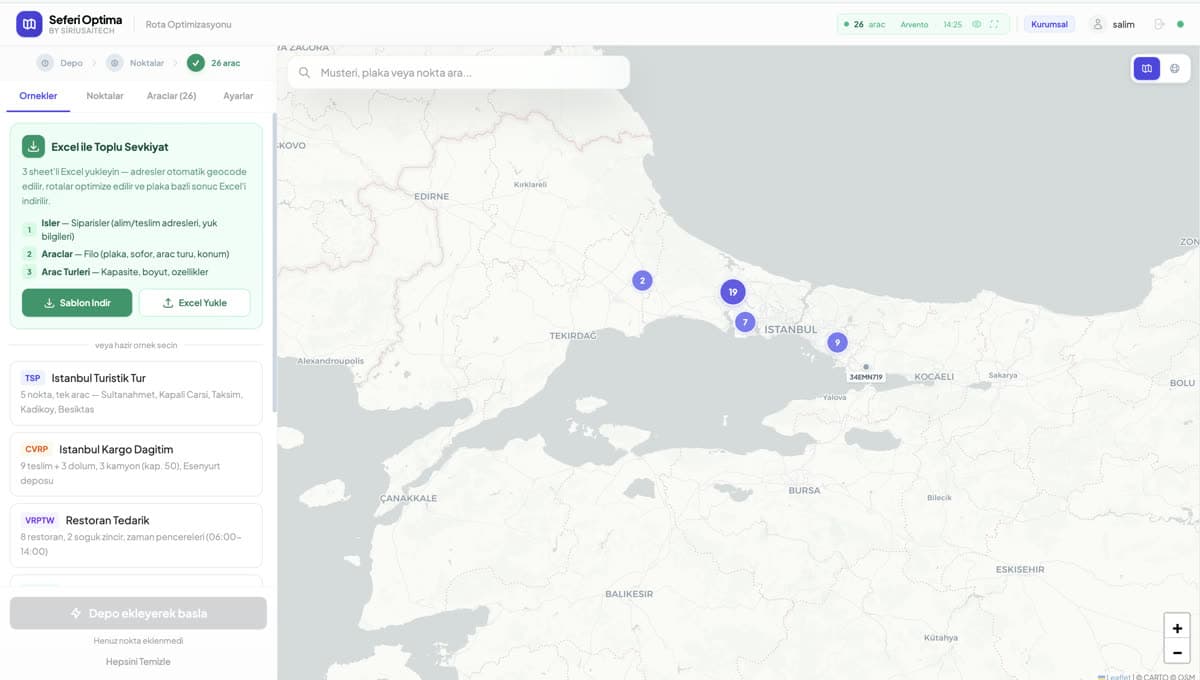
A planner's daily question never changes: how do I cover the jobs in front of me with the fewest vehicles and the shortest distance? Thirty jobs and twenty vehicles cannot be solved in your head, so everyone applies the first sensible split and the wasted kilometres stay invisible. Optima runs that calculation in the background and hands you a plan: how many vehicles, in what order, which jobs.
Product screen
It won't call a weak plan a good one
Optima rates its own output: recommended with confidence, worth reviewing, or weak. When it cannot produce a plan it tells you why — no active vehicle with capacity entered, addresses that don't work, and so on.
How the work flows
Not the shortest route, the right one
The calculation uses real road and traffic data rather than straight-line distance. Vehicle capacity, loading metres and working hours enter the plan as constraints.
- 1
Unassigned orders are collected
- 2
Constraints and vehicle availability are read
- 3
A plan is produced and rated
- 4
Assignment happens only once you approve
Panels on the screen
One plan for the whole team
When a plan is ready a banner appears above the orders page, with the number of pending plans bottom right. Plan history is kept: what was proposed on which day and which one was applied.
OptimaIt never assigns anything on its own. Every plan is shown to you; no order reaches a vehicle without your approval, and you can undo an applied plan within 15 seconds.
What's on the screen
The real names of the panels inside the product, and what each one shows.
- Run interval
- Once the interval you set has passed the system starts on its own; it runs in the background even if nobody keeps the app open.
- Orders considered
- Orders created in the last 90 days that are neither delivered nor cancelled. Orders with an empty pickup or delivery address are skipped.
- Vehicles used
- Active vehicles that have a capacity type assigned and a recent position. A vehicle with no capacity entered is left out automatically.
- Suggestion banner
- When a plan is ready a banner appears above the orders page. You open it with "Show", and apply it if you like it.
- Suggestion history
- What was proposed on which day, and which one was applied, stays on record.
- Run now
- Trigger a plan immediately without waiting for the interval.
What does this module take over?
On the left how it runs today, on the right how it runs in Seferi.
Thirty jobs and twenty vehicles cannot be solved in your head, so everyone applies the first sensible split.
Optima works through the alternatives and puts the result in front of you as a plan; wasted kilometres become visible.
Automated planning feels like the planner losing control.
Optima never assigns on its own. The plan goes to you for approval, and an applied plan can be undone within 15 seconds.
Two planners assign the same jobs to two different vehicles.
A plan is company-wide; once one person applies it, it closes for everyone else.
Used in the daily work
Every item maps to a screen inside the product — none of it is a roadmap.
- Runs in the background, reviewing unassigned orders every 15 minutes by default
- Trigger it whenever you like with "Run now"
- Calculates on real road and traffic data, not straight-line distance
- Respects your constraints: vehicle capacity, loading metres, working hours
- Hands back a plan: how many vehicles, in what order, which jobs
- Plan just the jobs you pick from the orders screen
- Plan history is kept: what was proposed on which day, and what was applied
Who uses it
The same module does not open the same screen for everyone on the team.
Planner
Opens the suggestion, applies what they like and skips what they don't. The decision stays with them.
Operations lead
Picks the urgent jobs that came up during the day and asks for a plan covering only those.
Manager
Sees from the suggestion history which plan was applied and which was skipped.
Once this module is switched on
In the demo you see these on your own data.
Connects to
The same work is done with fewer vehicles and fewer kilometres.
The planning decision stays with the planner; Optima is a second pair of eyes.
Two planners can no longer assign the same job to two vehicles.
What gets asked most before a demo
Does the system assign jobs to vehicles on its own?
No. Every plan is shown to you; no order reaches a vehicle without your approval, and you can undo an applied plan within 15 seconds.
When does no suggestion arrive?
When there are fewer than two active orders, when no vehicle has a capacity assigned, when a suggestion for the same orders is already pending, or when most orders are missing address information.
Will jobs already assigned to a vehicle be disturbed?
No. Assigned orders are reviewed too, but new orders are added without breaking the loads already on the vehicle.
How are vehicle and driver assignment done?
When Optima assigns a job to a vehicle, it weighs capacity, loading metres, the vehicle's current location and its working hours together. Driver assignment usually follows the vehicle — a job that lands on a vehicle passes automatically to whoever drives it. If no vehicle fits, no suggestion arrives, and the system shows why.
See Optima running on your own operation
The demo is not a slide deck; it is a session that runs on your own data.
- 01
A 30-minute call
We listen to your operation: how many vehicles, which lanes, which step is still done by hand today.
- 02
A run on your own data
We read a real request from your own inbox and turn it into a quote; you see your own lanes on screen.
- 03
A rollout plan
Which module goes live on day one, what gets migrated, and the per-vehicle price — in writing.